Neptune VPN
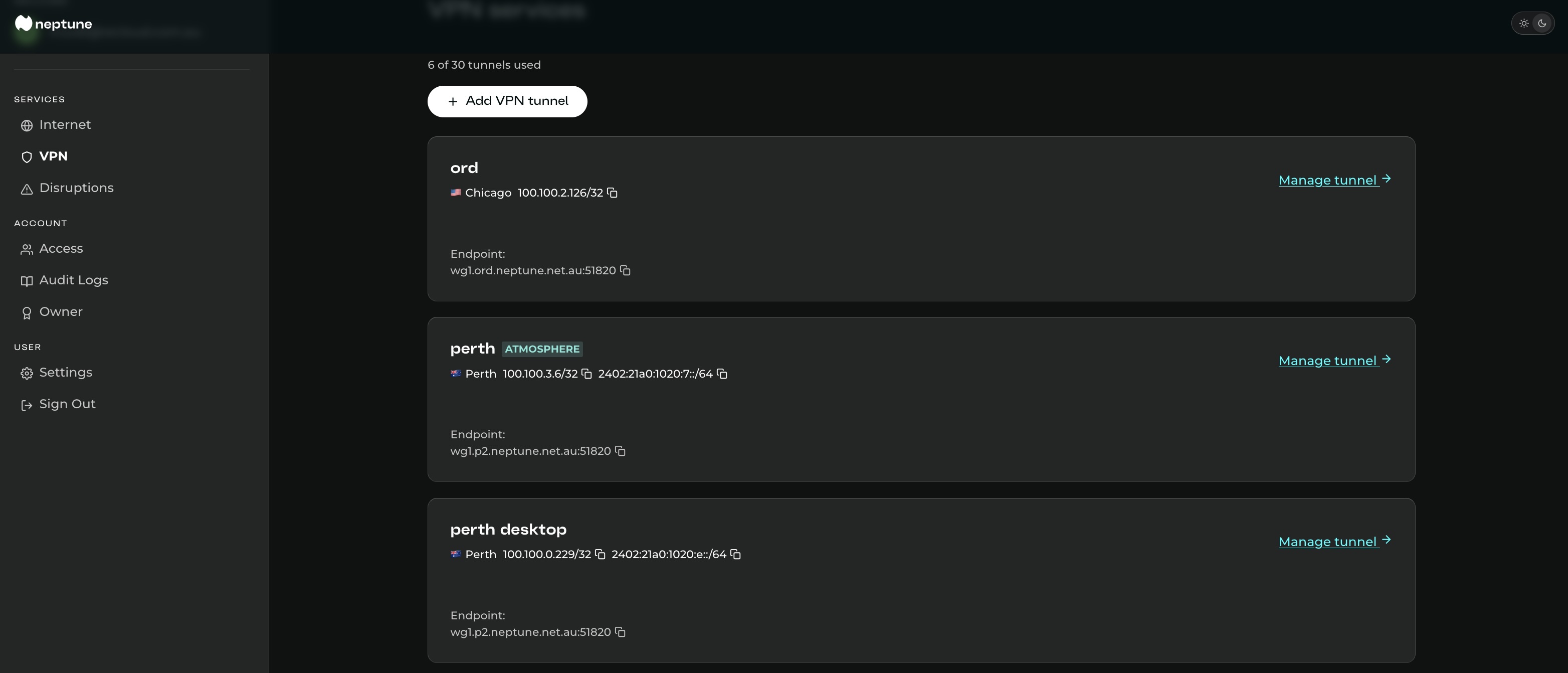
A managed WireGuard VPN included with every Neptune Internet service. Create a tunnel, scan the QR code, and connect through endpoints across Australia, North America, Europe, and Asia Pacific.
At a glance
Neptune VPN runs on WireGuard, a fast and modern VPN protocol supported on all major platforms. We look after the server side, generate the tunnel details for you, and give you a config file and QR code that work straight away in the official WireGuard app.
There are no separate VPN accounts to manage and no third-party VPN provider in the middle. Each Neptune Internet subscription includes up to two active tunnels, usually enough for a phone and a laptop. You can create, rename, and revoke tunnels at any time from your subscriber portal.
What can you use it for?
- Take Atmosphere with you. When you create a tunnel on an Australian endpoint, you can enable Atmosphere Protective DNS for that tunnel. That gives your device the same threat blocking, ad and tracker filtering, and allow/deny rules you use at home. See Atmosphere Protective DNS for more detail.
- Try a cleaner path for gaming or voice. Some games and voice services send traffic over strange or congested paths, especially to overseas servers. Terminating through Chicago, San Jose, Singapore, Tokyo, Frankfurt, London, or Amsterdam can sometimes give you a better route. It depends on the game, the server, and the time of day, but it is easy to test.
- Keep an Australian presence while travelling. Connecting through an Australian endpoint can help with banking, government services, streaming apps, and other sites that get nervous when your login suddenly appears from another country.
- Use public Wi-Fi with less risk. If you are on airport, hotel, café, or conference Wi-Fi, the tunnel encrypts traffic between your device and Neptune before it leaves through our network.
What Neptune VPN is not
Neptune VPN is not trying to be one of those “hide from everyone” consumer VPN products. It is a managed WireGuard service operated by your Internet provider. Traffic sent through the tunnel is still subject to the same Terms of Service and Fair Use Policy as your regular Neptune connection.
If you need anonymity against a serious adversary, that is a different problem and a different toolset. Neptune VPN is for practical everyday use: safer public Wi-Fi, choosing where your traffic exits, using Atmosphere on mobile devices, and keeping an Australian endpoint handy when you are overseas.
Available endpoints
Pick the location you want your tunnel to exit from. Australian endpoints support IPv4, IPv6, and optional Atmosphere Protective DNS. Overseas endpoints provide encrypted transport and use public DNS resolvers.
Australia
Melbourne
AU · Neptune
Sydney
AU · Neptune
Brisbane
AU · Neptune
Perth
AU · Neptune
Adelaide
AU · Neptune
North America
Chicago
US · Neptune
San Jose
US · Neptune
Asia Pacific
Mumbai
IN · Neptune
Hong Kong
HK · Neptune
Tokyo
JP · Neptune
Singapore
SG · Neptune
Europe
Paris
FR · Neptune
Frankfurt
DE · Neptune
London
GB · Neptune
Amsterdam
NL · Neptune
South America
Sao Paulo
BR · Neptune
Get Started
Head to your subscriber portal to create a VPN tunnel. If you’re not with Neptune yet, sign up for Neptune NBN® Internet first.
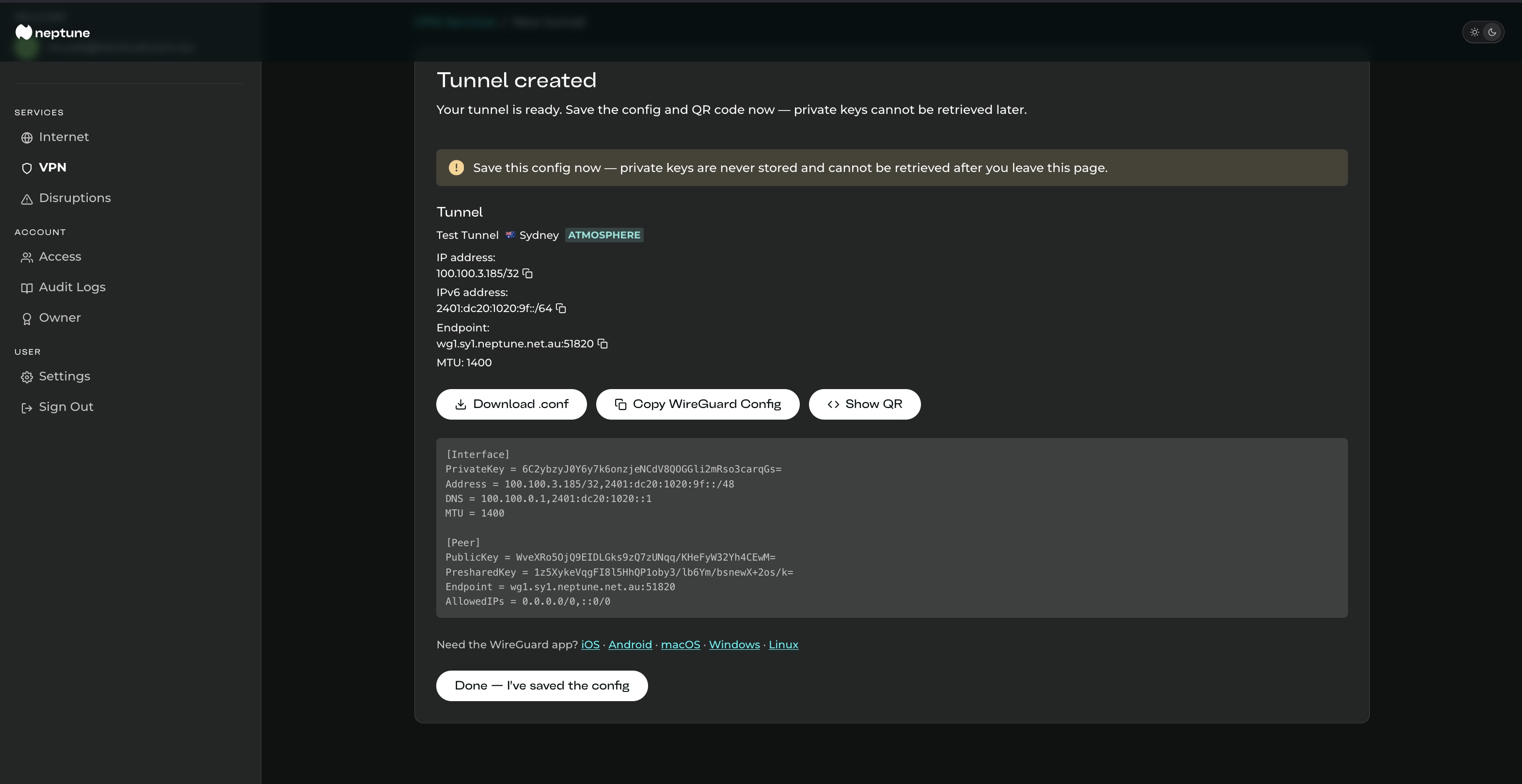
Neptune VPN works with the official WireGuard apps. Once you create a tunnel in the portal, either scan the QR code or import the config file. Both options create the same tunnel.
iOS
Download the official WireGuard app from the App Store.
Android
Download the official WireGuard app from Google Play.
macOS
Use the official WireGuard app from the Mac App Store.
Windows
Install WireGuard using the official Windows installer.
Linux
Install WireGuard using your distribution’s usual package tools.
Fine print
Neptune VPN is covered by our Terms of Service and Fair Use Policy. Two tunnels are included with each Neptune Internet subscription. Atmosphere Protective DNS is currently available on the five Australian endpoints: Melbourne, Sydney, Brisbane, Perth, and Adelaide. Overseas endpoints provide the same encrypted tunnel, but use public DNS resolvers.